Device Code Phishing: When the Real Microsoft Login Becomes the Trap
Device code phishing is one of those attacks that looks less dangerous at first glance than it really is. The victim does not necessarily land on a crude fake password page. They may not be asked for a password at all.
That is the trick.
The attacker starts a legitimate OAuth Device Authorization Flow in the background. The victim is convinced to enter the associated code and authenticate with their own Microsoft account. If that works, the session that receives the token is not controlled by the victim. It is controlled by the attacker.
This analysis is based on a real observed case. All company names, domains, codes, paths, and unique values have been anonymized or replaced. The original email was no longer retrievable from the mailbox. The available evidence included the subject, sender address, embedded link, and screenshots of the redirect and landing-page chain.
Executive Summary
In the observed case, the attack started with a short English email and a Google redirect link. The subject was:
Which of these Locations do you want this sent to?
The visible context looked like a shipping or delivery decision. After the click, the chain moved through a Google redirect URL to an intermediate delivery-themed page and then to a fake OneDrive page. That page displayed a device code and instructed the user to copy it and enter it at Microsoft.
For defenders, what matters most is where the evidence lives: not only in email logs, but above all in Entra ID sign-in logs.
What Device Code Phishing Abuses
The OAuth 2.0 Device Authorization Grant is a legitimate standard for devices where normal typing is difficult. A smart TV, printer, kiosk, IoT device, or CLI application can show a code and ask the user to enter that code on a separate login page.
In simplified form, the legitimate flow works like this:
- A device or app requests a device code.
- The app shows the user a short code and a verification address.
- The user opens the verification address on another device.
- The user signs in to the identity provider and confirms the code.
- The original app receives tokens and is signed in.
In a phishing scenario, the attacker controls the first step. They start the device code request themselves and show the associated code to the victim on a fake landing page. The victim then completes the real Microsoft login. From the identity provider’s perspective, the user authorized the code. From the attacker’s perspective, that is the win.
This makes the technique uncomfortable for defenders:
- The final sign-in can happen on a real Microsoft domain.
- MFA is not necessarily bypassed. It is completed by the victim.
- The attacker receives OAuth tokens instead of only a password.
- A password reset alone is not enough.
- Many classic URL or credential-phishing detections trigger too late because the critical interaction happens at Microsoft itself.
Case Study: The Observed Attack Flow
The original message could not be fully recovered. These elements were known:
| Field | Anonymized value | Assessment |
|---|---|---|
| Sender | low@attacker[.]com | Domain replaced. The original sender was not trusted |
| Subject | Which of these Locations do you want this sent to? | Delivery location lure |
| Email body | No longer available | Limitation of the analysis |
| Embedded link | see sanitized URL excerpt below | Google redirect as first visible disguise layer |
The observed redirect chain has been sanitized for this post:
https://www.google[.]com/url?q=http://adservice.google[.]com[.]ph/ddm/clk/424929466;226923624;r;u%3Dds%26amp;sv1%3D64195420186%26amp;sv2%3D3261659123742877%26amp;sv3%3D6702577448695742699%26amp;gclid%3DEAIaIQobChMIurHiwbHn8gIVBZ53Ch2TZAIsEAQYASABEgKAL_D_BwE;?//the****z[.]pk/s6/iykvfb0v/| Step | Observation | Public example value |
|---|---|---|
| 1 | Email contains Google redirect URL | https://www.google[.]com/url?q=http://adservice.google[.]com[.]ph/ddm/clk/424929466;226923624;r;...;?//the****z[.]pk/s6/iykvfb0v/ |
| 2 | First redirect hop | https://the****z[.]pk/s6/iykvfb0v/ |
| 3 | Intermediate page with delivery theme | https://agen***********[.]ro/feed/976235/ |
| 4 | Final device code landing page | https://5dgbibkkttqu3ufaccfowqrfunzquj.app***********[.]sbs/2C4F594E-0918-41C6-A9F8-14D7C6CE4471-F1F4BE99-lBEkUprGOULLuLis3iN44X9j0eNPTKOoSNLn289oHdmygmU5TBOOYh-9BO89f1sO648MS8Vj3NFUOTCzRBtt7VtpDWrQe-hTxwQkOKlKbLHv |
| 5 | User action | Copy code, continue to Microsoft, sign in |
The flow is notable because the first visible URL in the email points to Google. URL filters that inspect only the hostname of the initial link see google[.]com. The actual domain, the****z[.]pk, is deeply nested inside the redirect parameter and stays hidden. The full chain through the****z[.]pk to the intermediate page and then to the device code landing page only becomes visible after complete redirect resolution. That is the strength of this pattern: many filtering systems check the link from the email, not where it actually leads.
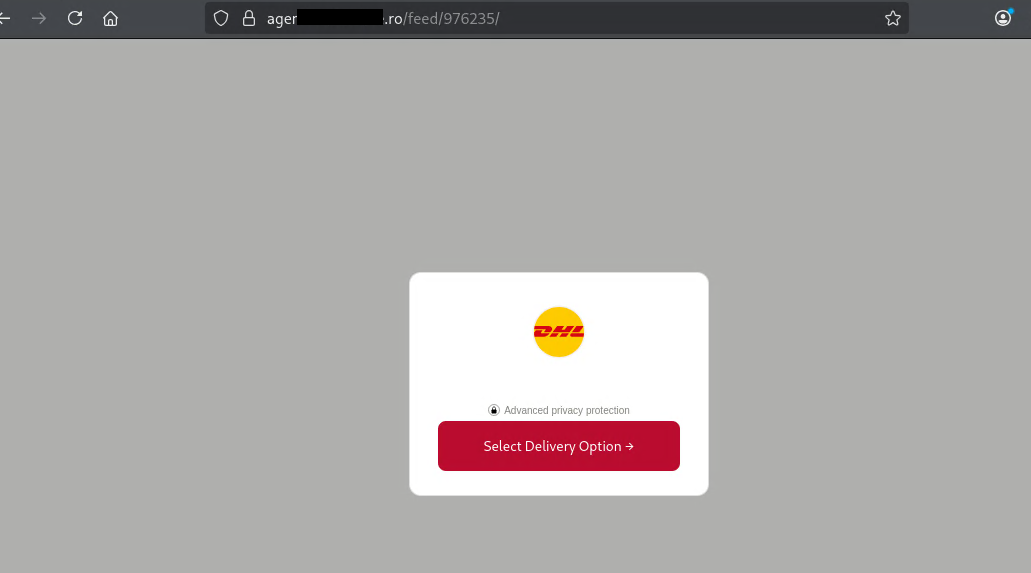
The intermediate page used a delivery-themed design and continued the flow through a button. One clarification on the redirect chain: the initial email link did not lead directly here. It first resolved through the Google redirect and then through the****z[.]pk/s6/iykvfb0v/ before the browser reached this page. That multi-hop chain serves two purposes: it reinforces the subject line’s context for the victim and it makes the final destination harder for URL filters to detect, because each redirect step moves the real host further from the original link in the email.
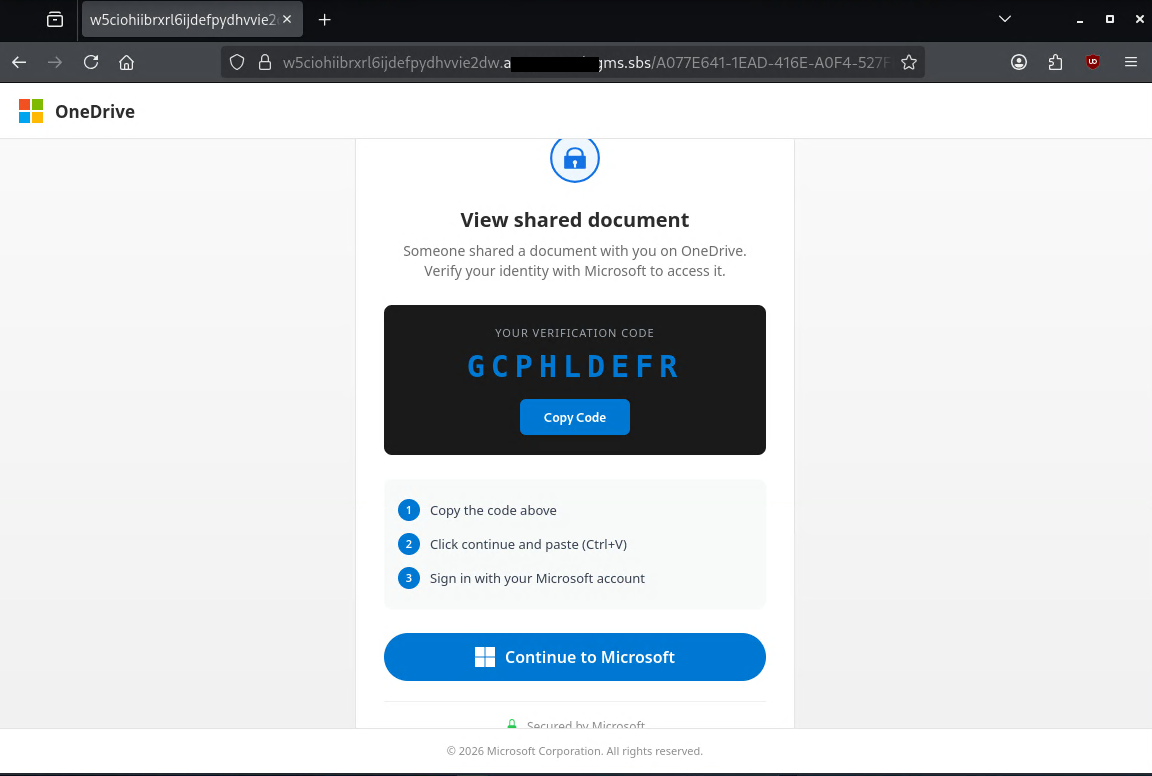
The final landing page changed the context: a delivery decision suddenly became an allegedly shared OneDrive document. That inconsistency is an important clue. The user was instructed to copy the displayed code, click “Continue to Microsoft”, and sign in with their Microsoft account.
Why This Chain Is Plausible
The attack combines several patterns that were increasingly documented in device code phishing campaigns during 2025 and 2026:
- Redirects through well-known services so the initial link looks less suspicious.
- Short-lived or dynamically generated device codes that are only shown when the landing page is visited.
- Fake Microsoft, OneDrive, SharePoint, DocuSign, or delivery pages as social context.
- Very long final paths with UUID-like or token-like segments.
- Instructions to copy and paste the code.
- Follow-on access to Microsoft 365.
Microsoft described device code phishing in campaigns such as Storm-2372 and later in AI-enabled attacks against Microsoft 365. Proofpoint, Huntress, and Sekoia also observed strong commoditization through phishing-as-a-service kits in 2026. The trend is clear: attackers are moving away from pure password theft and toward token-centered identity attacks.
What Can Happen After Successful Authorization
If the victim authorizes the code, the attacker can take different follow-on actions depending on the app, scopes, policy, and token context. Common objectives include:
- Accessing mailbox content.
- Searching for invoices, payment flows, active projects, and internal contacts.
- Sending additional phishing emails from a real account.
- Business email compromise.
- Creating or changing inbox rules.
- Setting up forwarding or delegations.
- Accessing files in OneDrive or SharePoint if the tokens and permissions allow it.
Not every device code phishing case automatically leads to all of these outcomes. The list is a rough overview and must be evaluated on a case-by-case basis.
User-Visible Warning Signs
The user perspective matters because device code phishing abuses legitimate parts of the login process. In this case, several visible inconsistencies were present:
- The subject mentions locations and shipping, while the final page mentions a shared OneDrive document.
- The email starts with a Google redirect instead of a direct link to a known provider.
- The delivery page and OneDrive-themed page are not hosted on expected domains.
- The user is asked to copy a code even though they did not set up a new device.
- The page describes the value as a “verification code” but does not clearly explain which app is being authorized.
- The final host is long, random-looking, and untrusted.
A simple awareness rule helps:
Only enter a Microsoft device code when you are intentionally setting up a device or trusted application yourself. A code received through email, chat, PDF, QR code, or an unfamiliar website is an incident signal.
Relevant Telemetry
For first triage, focus on one chain: who received the email, who clicked, who reached the code page, and who then signed in through Device Code Flow?
| Source | What to check |
|---|---|
| Email / URL clicks | Recipients, clicks on google[.]com/url, Safe Links rewrites, and internal forwarding. |
| Proxy / DNS / browser | Host sequence: Google redirect, first redirect hop, intermediate page, final device code page, then Microsoft login or device-login endpoints. |
| Entra ID sign-in logs | AuthenticationProtocol, OriginalTransferMethod, AppDisplayName, ClientAppUsed, UserPrincipalName, IPAddress, Location, CorrelationId, ConditionalAccessStatus. Focus on deviceCode (initial sign-in) or deviceCodeFlow (follow-on sessions). |
| Mailbox / Graph | After confirmed sign-in: MailItemsAccessed, unusual Graph access, new inbox rules, forwarding, delegations, or suspicious outbound mail. |
The key signal is timing: URL click, visit to the final code page, and device code sign-in by the same user in a short window.
Detection Query
The following query is a starting point. Field names can differ by tenant, connector, and data model. Combine it with local baselines, allowlists, and known legitimate device code applications. AuthenticationProtocol == "deviceCode" marks the initial device code sign-in and is only set by Entra ID on a successful sign-in. OriginalTransferMethod == "deviceCodeFlow" tags follow-on sessions that reuse tokens minted via the flow.
Microsoft Sentinel / KQL: Find Device Code Sign-ins
SigninLogs
| where TimeGenerated > ago(14d)
| extend
    AuthProtocol = tostring(column_ifexists("AuthenticationProtocol", "")),
    TransferMethod = tostring(column_ifexists("OriginalTransferMethod", ""))
| where AuthProtocol has_cs "deviceCode"
   or TransferMethod has_cs "deviceCodeFlow"
| project
    TimeGenerated,
    UserPrincipalName,
    AppDisplayName,
    ClientAppUsed,
    AuthProtocol,
    TransferMethod,
    IPAddress,
    Location,
    UserAgent,
    ConditionalAccessStatus,
    ResultType,
    ResultDescription,
    CorrelationId
| order by TimeGenerated desc
Possible Detection Signals
The following signals are not fixed IOCs. They can help identify device code phishing, but they should always be evaluated in the context of the specific campaign, environment, and telemetry.
| Type | Signal | Why it matters | Confidence |
|---|---|---|---|
| Email URL | https://www.google[.]com/url?q=... with a nested external target URL | Legitimate redirector services can hide the real destination in the first email link. | Medium |
| Entra ID sign-in | AuthenticationProtocol contains deviceCode or OriginalTransferMethod contains deviceCodeFlow | The core identity signal for a device code authorization. | High |
Triage During a Suspected Case
If a user clicked such a link or entered a device code, the response should be token-centered. A password reset alone is not enough.
- Identify users who received or clicked the email.
- Review Entra ID sign-in logs for Device Code Flow, unusual apps, and suspicious IPs.
- Revoke refresh tokens and sign-in sessions.
- Change the password if credential exposure cannot be ruled out.
- Review MFA methods, especially newly added methods.
- Block observed URLs and domains in the mail gateway, proxy, DNS filter, or EDR.
Reducing Risk
The most effective measure is to block Device Code Flow when it is not required by the business. Microsoft supports Conditional Access controls for authentication flows. Before hard-blocking, run the policy in report-only mode to understand which legitimate workflows would be affected.
Practical measures:
- Conditional Access: block Device Code Flow or tightly scope it to allowed users, devices, locations, and apps.
- Block Authentication Transfer if it is not needed.
- Teach users that real Microsoft pages can still be part of an attack.
- Build alerts for device code sign-ins outside known legitimate use cases.
Detection Gap Challenge
Could your environment answer these questions in under 10 minutes?
- Which users received emails with this subject or from this sender?
- Which users clicked the Google redirect?
- Which devices reached the final device code phishing page?
- Which users completed a sign-in through the Device Code Flow?
Unclear answers show where visibility, correlation, or triage processes should be improved.
Sources and Further Reading
- RFC 8628: OAuth 2.0 Device Authorization Grant
- Microsoft: Storm-2372 conducts device code phishing campaign
- Microsoft: AI-enabled device code phishing campaign
- Microsoft Learn: Block authentication flows with Conditional Access
- Microsoft Learn: Authentication flows in Conditional Access
- Proofpoint: Device Code Phishing Evolution and Identity Takeover
- Huntress: Railway PaaS M365 token replay campaign
- Huntress: Kali365 device code phishing kit
- Sekoia: EvilTokens device-code Phishing-as-a-Service
- FBI IC3: Kali365 public service announcement
Not sure your stack would catch this?
Contact me to schedule a no-obligation conversation.
Email me →